
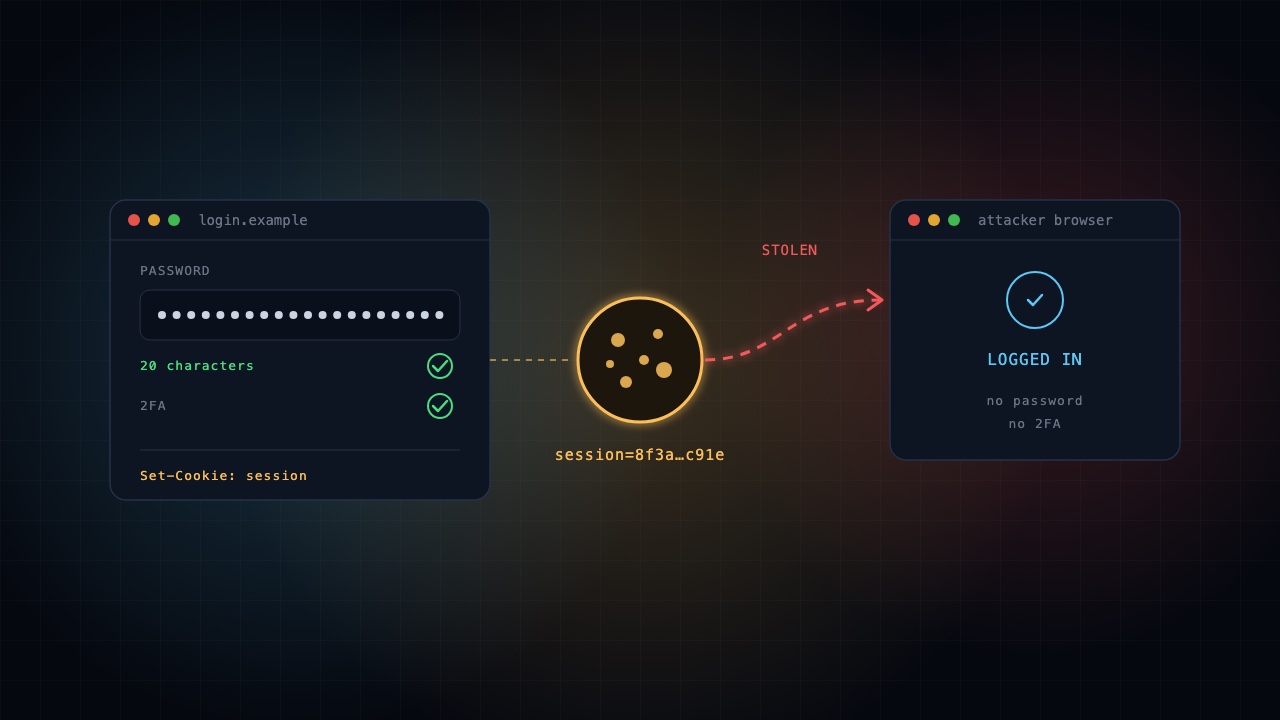
Even a 20-character password can be useless.
When you log in to a website, it creates a session cookie so you don't have to enter your password on every page.
If a hacker steals that cookie, they may be able to access your account without knowing your password or completing two-factor authentication again.
How do cookies get stolen? Infostealer malware, malicious browser extensions and phishing proxies are common methods.
5 practical steps to protect yourself
- Update your system: Turn on automatic updates for Windows/macOS and your browser.
- Check browser extensions: Open your browser's Extensions page and remove anything unfamiliar or unnecessary.
- Avoid cracked software: Don't install pirated applications, unofficial activators or downloads from untrusted sites.
- Scan for malware: On Windows, run a Microsoft Defender Full Scan. If you suspect an infostealer, use a trusted, clean device to secure your accounts.
- Review active sessions: Check Security → Devices/Sessions in your important accounts. Sign out unfamiliar sessions and revoke others if compromise is suspected.
Important: Logging out of all devices won't solve the problem if malware remains on your computer and steals your next session cookie.
Secure the device first. Then secure your accounts.
Build ➜ Hack ➜ Investigate ➜ Secure ➜ Audit
Master the complete cyber lifecycle with the ASCL Certified Cyber360 Professional course.
Explore the Cyber360 course