
Incognito mode doesn't make you anonymous.
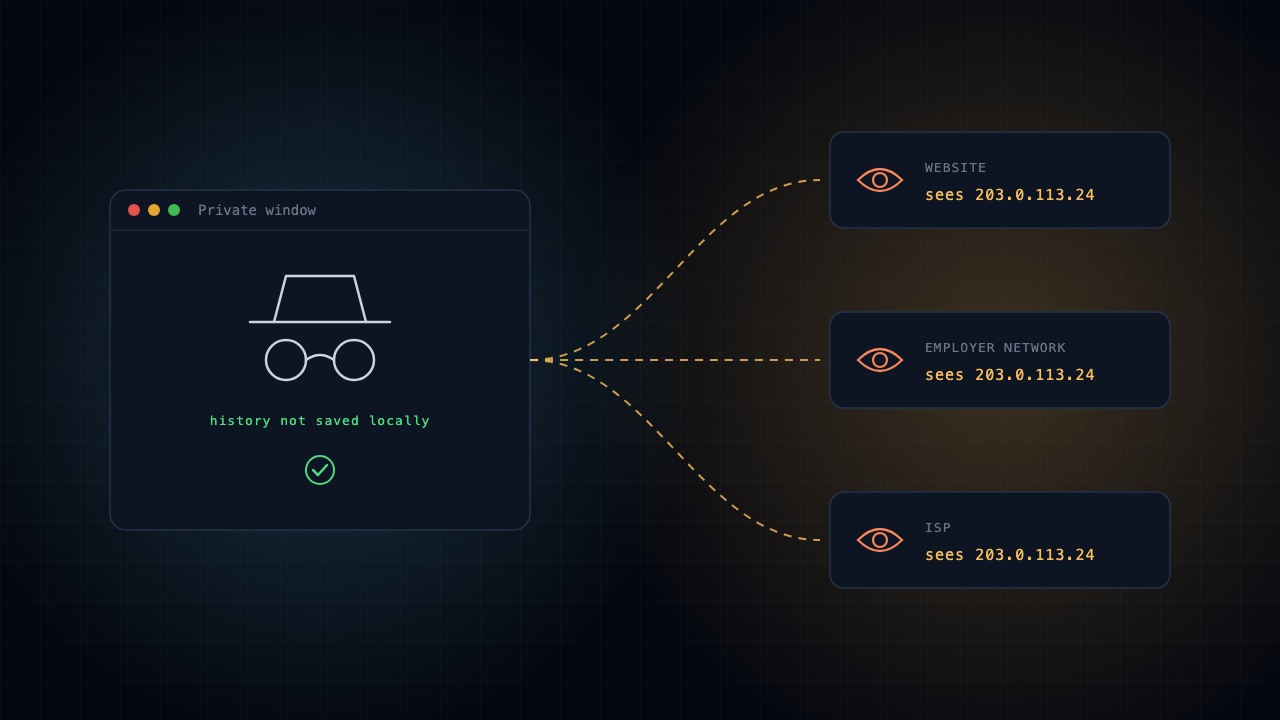
When you browse in Incognito or Private mode, your browser generally doesn't save your browsing history, cookies or form data after you close all private windows.
But your activity can still be visible to websites, your employer, school or internet service provider.
What Incognito mode actually does
- Prevents browsing history from being saved locally.
- Deletes session cookies when you close all Incognito windows.
- Keeps your private browsing sessions separate from regular browsing.
What it doesn't do
- Hide your IP address from websites.
- Hide your activity from your employer or network administrator.
- Prevent websites from tracking you through logins or browser fingerprinting.
Quick test: Open an Incognito window and visit whatismyipaddress.com. You'll generally see the same public IP address as in your regular browser.
The takeaway: Incognito mode protects your local browsing privacy. It doesn't make you invisible online.
Build ➜ Hack ➜ Investigate ➜ Secure ➜ Audit
Master the complete cyber lifecycle with the ASCL Certified Cyber360 Professional course.
Explore the Cyber360 course